

Connect Systems.Unify Data.Launch Portals.
SecureSync brings your CRM, billing, support, and subscription data into one source of truth, then lets you build branded self-service portals your clients will love.
30-day free trial on the Standard plan. No credit card required.
Connect Everything
Bring data from the tools you already use into one unified platform. Our integration library is growing fast, with new connectors added regularly.
Zoho Ecosystem
CRM, billing, support, subscriptions, forms, bookings, and analytics connected out of the box.


Expanding Platform
New connectors are being built so you can unify data across any stack.
Connect proprietary systems or internal APIs to bring data from any source.
Get Up and Running in Three Steps
Go from scattered tools to a unified client experience in minutes, not months.

1. Connect your platforms
Sign in with OAuth and choose the systems you want to sync. Takes under a minute per app.

2. Unify your users
SecureSync automatically matches and links each customer's identity across all your connected systems.
3. Launch your portal
Configure your branding, pick which data to surface, and invite your first clients. They're live the same day.
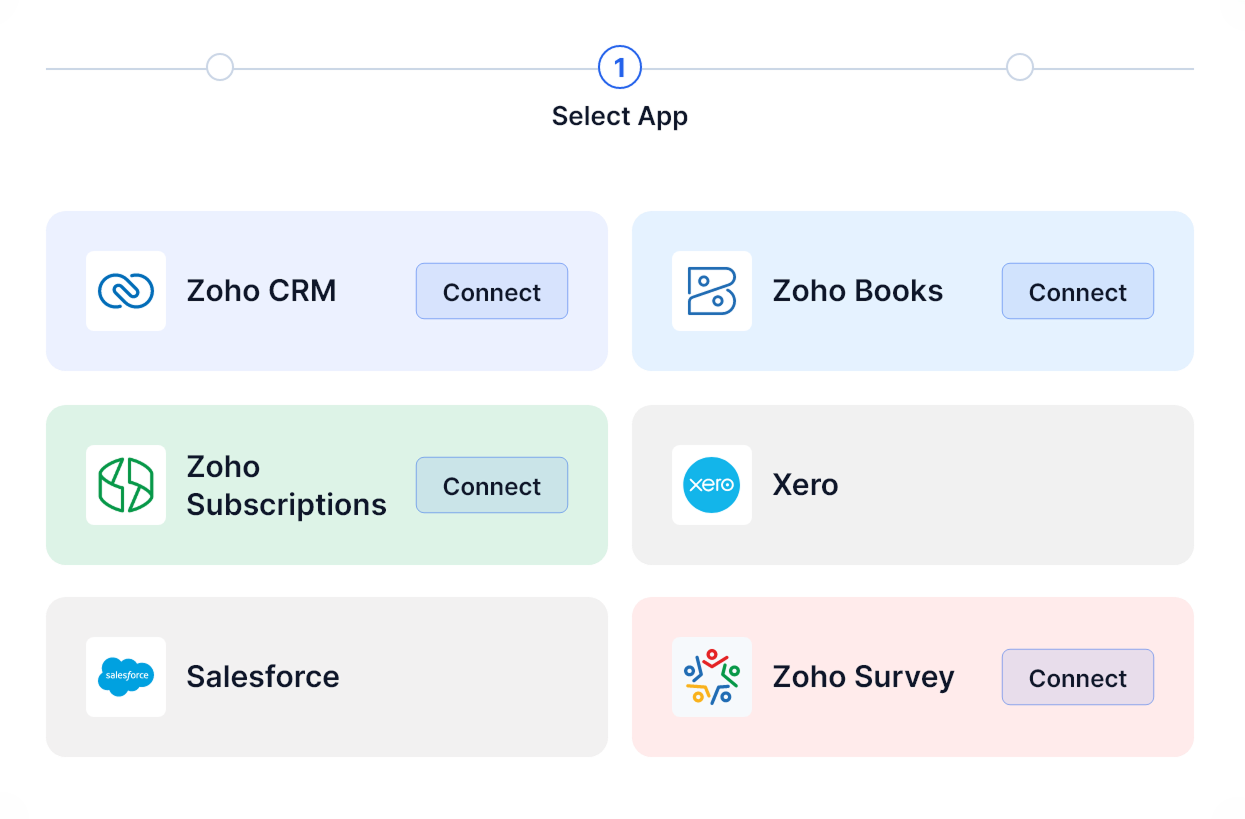
1. Connect your platforms
Sign in with OAuth and choose the systems you want to sync. Takes under a minute per app.
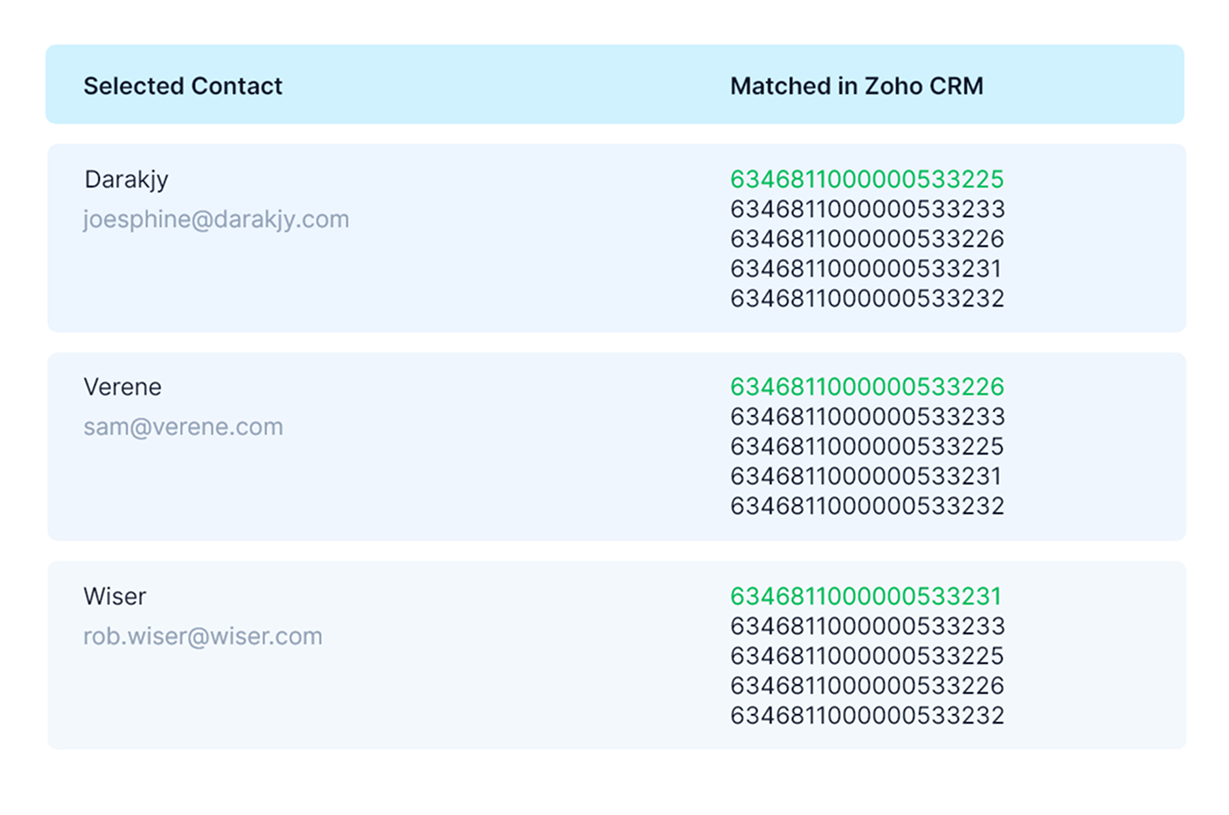
2. Unify your users
SecureSync automatically matches and links each customer's identity across all your connected systems.
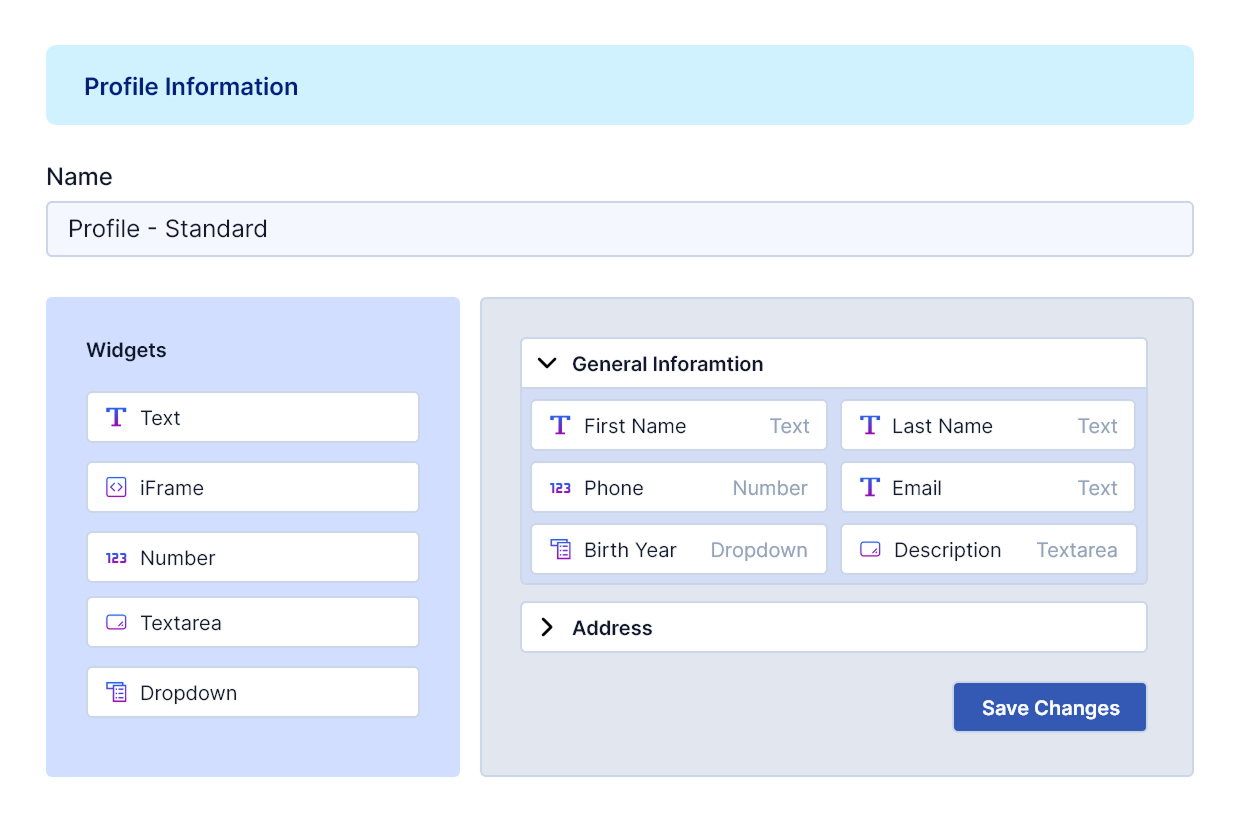
3. Launch your portal
Configure your branding, pick which data to surface, and invite your first clients. They're live the same day.
See what SecureSync can do
From connecting your systems to launching client portals, everything works together in one platform.
Connect Your Systems
Link every tool in a few clicks.
- Authenticate via secure OAuth with least-privilege scopes, no passwords stored
- Choose exactly which tables and fields to sync from each connected system
- Set sync intervals to match your needs, from hourly to every 10 minutes, or use webhooks for instant updates
Unified Customer View
One identity across every system.
- Automatically match users across all connected systems using email, phone, and name
- Set confidence thresholds for auto-merge, with a review queue for uncertain matches
- Portal users log in once and see their own invoices, tickets, subscriptions, and files in a single view
Build Client Portals
Self-service your clients will actually use.
- Drag-and-drop layout builder with tables, charts, KPI cards, forms, and file exchange widgets
- Role-based access so each user type sees only the data relevant to them
- Every portal action writes back to your source systems with a full audit trail
Govern & Control
You decide what flows where.
- Define which system is the source of truth for every field, so changes propagate correctly
- Track every create, update, and delete with detailed audit logs and change history
- Every SecureSync organization gets its own isolated database, so your data is never mixed with another customer's
Built for Real-World Scenarios
SecureSync adapts to any industry. Here are just a few ways teams use it every day.

Nonprofit Donor & Volunteer Hub
Education & Nonprofits
Insurance Broker Client Portal
Financial Services & Accounting
Construction & Field Service Orders
Field Service & Operations
Public Records Requests (FOIA)
Government & Public Sector
Clinical Trial Participant Portal
Healthcare & Life Sciences
Forecast & Inventory Collaboration
Manufacturing & Supply Chain
eDiscovery Evidence Exchange
Professional Services & Agencies
Property Management Tenant Portal
Real Estate & Property
Loyalty Program Member Hub
Retail, Membership & Media
B2B SaaS Customer Success & Billing Portal
Technology & SaaS
Event Management: Vendors & Sponsors
Travel, Events & Hospitality
Energy Customer Interconnection
Utilities, Energy & TelecomDesigned for Safety, Built for Trust
Enterprise-grade security at every layer. Your data stays protected, private, and fully under your control.
Token-Based Authentication
Secure OAuth 2.0 connections with least-privilege connectors. No passwords stored, ever.
Encryption Everywhere
All data encrypted in transit (TLS 1.3) and at rest (AES-256). Zero plain-text exposure.
Granular Role-Based Access
Fine-grained permissions with full audit trails on every read and write-back operation.
Compliance-Ready Architecture
Built to meet SOC 2 Type II, HIPAA, and GDPR requirements. BAA available for healthcare customers.
Real-Time Audit Logs
Every action tracked and time-stamped. Exportable logs for compliance reviews and investigations.
Privacy by Design
Minimal data collection, purpose-limited processing, and easy data deletion requests.
Pick Your Plan. Launch Your Vision.
Simple, transparent pricing. No hidden fees, no surprises. Start small and scale as you grow.
Standard
Everything you need to securely sync data from your external systems and deliver it through a branded client portal.
1 portal, 2 external systems, 500 users, 100,000 records
Start Free Trial- 1 branded client portal
- 2 external system connections
- Up to 500 portal users
- 100,000 synced records
- Portal templates included
- Basic write-back
- Email support
Professional
Higher limits and more flexibility for teams managing multiple portals, more external systems, and larger data volumes.
2 portals, 4 external systems, 5,000 users, 500,000 records
Get Started- 2 branded client portals
- 4 external system connections
- Up to 5,000 portal users
- 500,000 synced records
- Advanced data governance rules
- Role-based access controls
- API access
- Priority email support
Enterprise
Maximum scale and control for complex organizations, including HIPAA compliance and premium support.
4 portals, 6 external systems, 10,000 users, 1,000,000 records
Contact Sales- 4+ branded client portals
- 6+ external system connections
- 10,000 portal users
- 1,000,000+ synced records
- HIPAA-ready configuration
- SSO / SAML integration
- Custom data governance policies
- Dedicated account manager
- SLA with uptime guarantee
- Premium support
Need more? Add as you go.
Adds 1 additional portal to your subscription.
Adds 1 additional external system connection.
Increases your total synced record limit by 100,000.
Increases your total synced record limit by 1,000,000.
Adds 500 portal user seats across your portals.
Frequently Asked Questions
Everything you need to know about SecureSync. Can't find what you're looking for? Reach out to us.
SecureSync is a data unification platform that connects your CRM, billing, support, and subscription systems into one source of truth. It then lets you build branded self-service portals where your clients can view and act on their data from every connected system with a single login.
SecureSync is built to integrate with a wide range of CRM, billing, support, and subscription platforms. Our integration library is actively growing, with new connectors being added regularly. If you have a specific system in mind, reach out and we can let you know the current status or prioritize it on our roadmap.
The free trial gives you full access to the Standard plan for 30 days. No credit card is required to start. You can connect your systems, set up a portal, and invite clients. If you decide to continue after the trial, you simply choose a plan.
Highly customizable. You can add various types of widgets (data tables, charts, KPIs), embed forms and reports, upload custom branding, and configure sidebar navigation to match your workflow. You can also create different portal profiles for different user roles, so an admin sees different content than a standard user. Mass user invitations make onboarding easy at scale.
Yes. Every client organization's data is stored in its own dedicated database, fully isolated from other tenants. This architecture ensures that one client's data can never be accessed by or leaked to another. Combined with encryption at rest (AES-256) and in transit (TLS 1.3), your data stays private and protected.
SOC 2 Type II audit is in progress. HIPAA-ready plans are available with a Business Associate Agreement (BAA) for healthcare customers. We follow GDPR-compliant data handling practices including purpose-limited processing and easy data deletion requests.
No. SecureSync is designed for business teams. You can connect systems via secure OAuth in a few clicks, configure portals with drag-and-drop widgets and templates, and launch without writing any code. Advanced customization options are available for teams that want more control.
Each portal is a branded, white-labeled web application with sidebar navigation. Clients log in once and see their data from every connected system in sections you define, such as invoices, support tickets, files, and account details. You can embed forms, add report widgets, display KPI cards, and fully control the layout and branding.
Yes. You can create multiple portal profiles with different permissions and layouts. For example, a finance contact might see invoices and payment history, while an operations contact sees support tickets and project files. You control exactly what each user type can view and interact with.
A synced record is any individual data record (like a contact, invoice, or support ticket) that SecureSync keeps in sync between your connected systems and the client portal. Each plan includes a set number of synced records, and you can add more with add-on packs.
An external system is any third-party application you connect to SecureSync, such as your CRM, billing software, or support desk. For example, connecting both Salesforce and QuickBooks counts as 2 external systems.
Yes. When clients take actions in their portal (like updating contact details or approving a document), SecureSync can write those changes back to the appropriate source system. This keeps your data consistent across all platforms.
Yes. You can upgrade at any time, and the change takes effect immediately. Downgrades take effect at the start of your next billing cycle, provided your usage is within the target plan's limits.
Data is stored in US-based data centers by default. Each client's data lives in its own isolated database for maximum security. Per-tenant data residency options are available on Enterprise plans for organizations with specific geographic requirements.
Ready to see SecureSync in action?
Start your 30-day free trial on the Standard plan. No credit card required. Set up your first portal in minutes.
Have questions? Reach us at contact@securesync.ai
Let's talk about your project
Tell us about your systems and goals. We'll show you how SecureSync can bring it all together.